
Code Generation with ChatGPT o1-preview. Ongoing Story.
Asking ChatGPT to generate code from code descriptions rather than from baseline code.

I recently wrote an article for *AI Advances* on the importance of collaboration in software development with generative AI. In the overview, I explained that code-generation exercises can...
…illustrate the importance of human-AI collaboration, emphasizing the synergy achieved when human expertise enhances AI effectiveness. The model’s outputs can be better guided toward practical solutions by providing targeted knowledge and context. This collaborative dynamic showcases how human intuition and AI assistance can productively complement each other.
Read the full article here:

I continue experimenting with and expanding on the code generation scenario described in the article, guiding ChatGPT (o1-preview) to generate a C++ and Python sentiment analysis tool. I'm documenting my insights along the way through posts here.
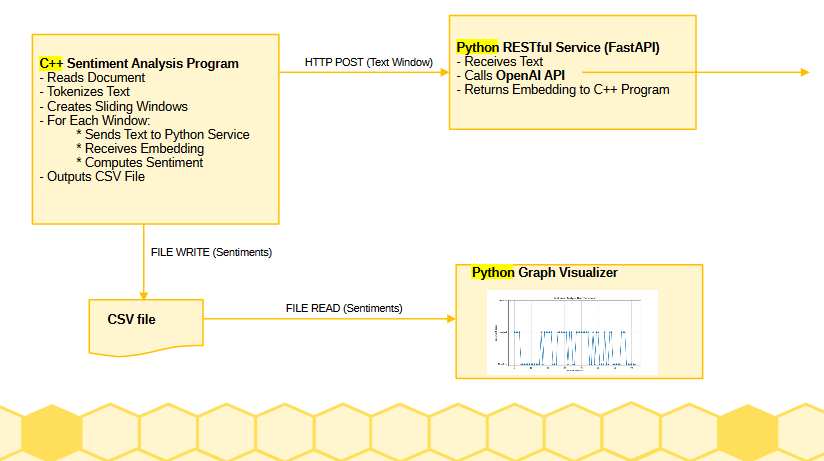
The post outlines the software and its architecture. To recap, there are three components: a C++ client, a Python server, and a Python visualizer. The architecture is illustrated in Figure 2.
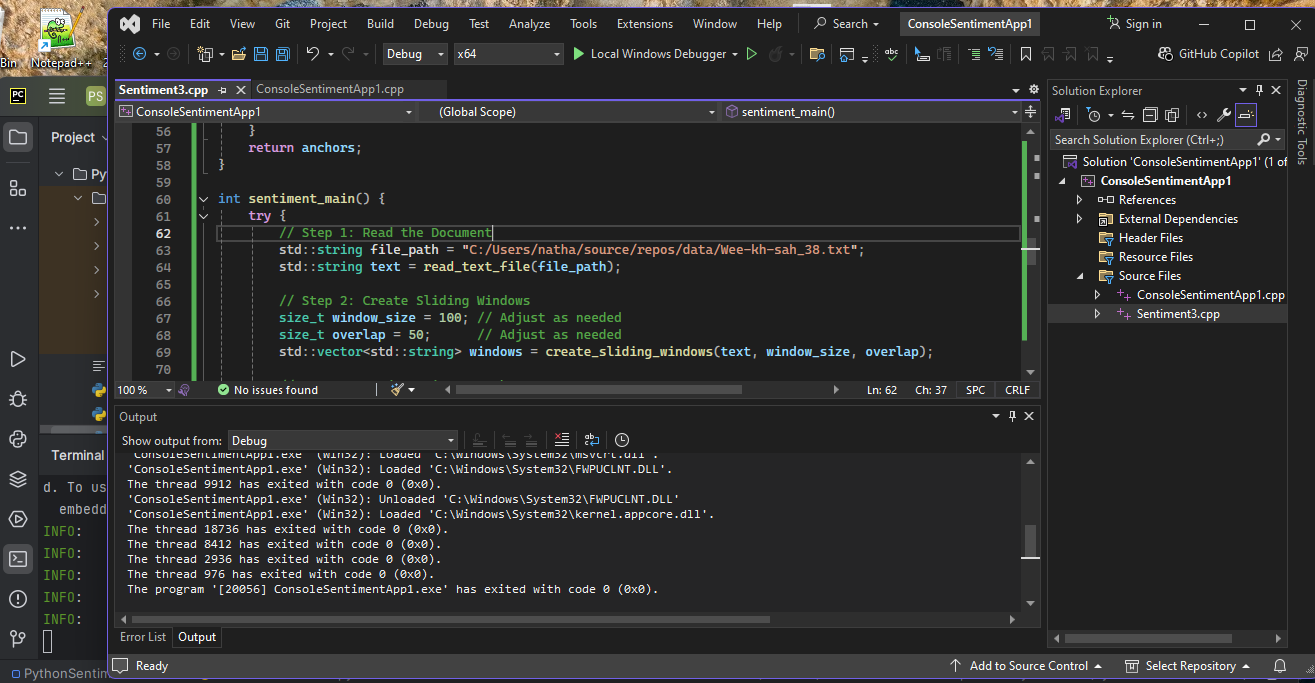
The C++ client was built and executed using Microsoft Visual Studio Community 2022 Version 17.11.5. The Python service was run locally within the virtual environment of PyCharm 2024.1 (Community Edition) using Python 3.11. Figure 3 shows the desktop arrangement.
I revisited the code generation experiment from the article, but this time from a different angle. I began by asking ChatGPT (o1-preview) to review the article's C++ client and Python server code and provide a detailed description of the code and their interactions. ChatGPT returned an accurate, in-depth description, which is provided below.
**Overview:**

The provided code consists of two programs:

1. **Python Server (`app.py`):** A FastAPI application that serves as a RESTful API endpoint for generating text embeddings using OpenAI's embedding models.

2. **C++ Client (`main.cpp`):** A C++ application that reads a text file, processes it into overlapping windows, requests embeddings for these windows from the Python server, and performs sentiment analysis based on cosine similarity with predefined sentiment anchors.

These two programs interact through HTTP requests: the C++ client sends POST requests to the Python server to obtain embeddings, and then uses these embeddings for sentiment analysis.

---

**Detailed Description of Each Program:**

### **Python Server (`app.py`):**

#### **Purpose:**

To provide a RESTful API endpoint (`/embed`) that accepts text input and returns its embedding vector using OpenAI's embedding model `text-embedding-ada-002`.

#### **Key Components and Flow:**

1. **Imports and Dependencies:**

   - `fastapi`: For creating the web server and defining API endpoints.
   - `pydantic`: For data validation (defines the data model for incoming requests).
   - `langchain.embeddings`: Provides an interface to OpenAI's embedding models.
   - `os`: For accessing environment variables.

2. **API Key Setup:**

   - Attempts to retrieve the OpenAI API key from an environment variable `OPENAI_API_KEY`.
   - Alternatively, the API key is hardcoded (which is generally not recommended for security reasons).

3. **Embedding Model Initialization:**

   - Initializes the `OpenAIEmbeddings` model with the specified model name (`text-embedding-ada-002`) and the API key.
   - Encloses the initialization in a try-except block to handle any exceptions that may occur during initialization.

4. **Data Model Definition:**

   - Defines a `TextData` class using Pydantic's `BaseModel`, which includes a single field `text` of type `str`.

5. **API Endpoint (`/embed`):**

   - Defines a POST endpoint at `/embed` that accepts a `TextData` object.
   - When a request is received:
     - Extracts the text from the request.
     - Uses the `embed_query` method of the embedding model to generate an embedding vector for the text.
     - Returns the embedding vector as a JSON response.
   - Includes error handling to catch exceptions during the embedding process and returns an HTTP 500 error with the exception details if an error occurs.

6. **Running the Server:**

   - The comment at the top provides the command to run the server using Uvicorn:

     ```bash
     uvicorn sentiment_server:app --host 0.0.0.0 --port 8000
     ```

   - This command starts the FastAPI application, making it accessible on all network interfaces at port 8000.

#### **Interactions with the C++ Client:**

- The Python server waits for HTTP POST requests at the `/embed` endpoint.
- When the C++ client needs an embedding for a piece of text, it sends a POST request to this endpoint.
- The server processes the request and returns the embedding vector, which the client then uses for sentiment analysis.

---

### **C++ Client (`main.cpp`):**

#### **Purpose:**

To perform sentiment analysis on a text document by:

- Reading and preprocessing the text.
- Dividing the text into overlapping windows.
- Requesting embeddings for each window from the Python server.
- Comparing these embeddings to sentiment anchor embeddings to classify the sentiment of each window.
- Outputting the results to a CSV file for visualization.

#### **Key Components and Flow:**

1. **Imports and Dependencies:**

   - Standard libraries (`iostream`, `fstream`, `sstream`, etc.) for file I/O and string manipulation.
   - `httplib.h`: A C++ HTTP client library for making HTTP requests to the Python server.
   - `nlohmann/json.hpp`: A JSON library for C++ to parse and generate JSON data.

2. **Utility Functions:**

   - **`read_text_file`:** Reads the entire content of a text file into a `std::string`.
   - **`tokenize_text`:** Splits the text into words using whitespace as the delimiter.
   - **`create_sliding_windows`:** Generates overlapping windows (chunks) of tokens from the text.
     - Parameters:
       - `window_size`: The number of tokens in each window.
       - `overlap`: The number of tokens that overlap between consecutive windows.
   - **`get_embedding`:** Sends a POST request to the Python server's `/embed` endpoint to obtain the embedding of a given text.
     - Uses `httplib::Client` to connect to `localhost` on port `8000`.
     - Constructs a JSON object with the text and sends it to the server.
     - Parses the JSON response to extract the embedding vector.
     - Handles HTTP errors and exceptions.
   - **`cosine_similarity`:** Calculates the cosine similarity between two embedding vectors.
   - **`assign_sentiment`:** Determines the sentiment of a text window by comparing its embedding to three sentiment anchor embeddings (Positive, Neutral, Negative).
     - Calculates the cosine similarity between the window's embedding and each of the anchor embeddings.
     - Assigns the sentiment corresponding to the highest similarity score.

3. **Main Function (`sentiment_main`):**

   - **Step 1: Read the Document**
     - Specifies the file path to the text document (e.g., `"C:/Users/natha/source/repos/data/Wee-kh-sah_38.txt"`).
     - Reads the entire content of the file into a `std::string` using `read_text_file`.
   - **Step 2: Tokenize the Text**
     - Splits the text into tokens (words) using `tokenize_text`.
   - **Step 3: Create Sliding Windows**
     - Defines `window_size` and `overlap` to control the size and overlap of text windows.
     - Generates overlapping text windows using `create_sliding_windows`.
   - **Step 4: Get Embeddings for Sentiment Anchors**
     - Defines three sentiment anchor texts:
       - Positive: `"I am happy"`
       - Neutral: `"It is a day"`
       - Negative: `"I am sad"`
     - Obtains embeddings for each of these anchors using `get_embedding`.
   - **Step 5: Process Each Window (with Multithreading)**
     - Initializes vectors to store sentiments and positions.
     - Creates a mutex `mtx` for thread-safe operations.
     - Uses a loop to process each window in a separate thread:
       - Obtains the embedding for the window using `get_embedding`.
       - Assigns a sentiment to the window using `assign_sentiment`.
       - Stores the sentiment and position in shared vectors, protected by the mutex.
     - Joins all threads to ensure completion before proceeding.
     - **Optional Smoothing:**
       - Includes commented code for simple moving average smoothing, which can be enabled if desired.
   - **Step 6: Output Results to CSV**
     - Writes the sentiments and their corresponding positions to a CSV file (`"sentiment_results.csv"`).
     - The CSV file has two columns: `Position` and `Sentiment`.
   - **Error Handling:**
     - Encloses the main processing steps in a try-catch block to handle exceptions.
     - Outputs error messages if exceptions occur.

4. **Execution:**

   - The `sentiment_main` function is the entry point for sentiment analysis.
   - When executed, the program outputs a message indicating completion and the location of the results.

#### **Interactions with the Python Server:**

- The C++ client sends HTTP POST requests to the Python server at `http://localhost:8000/embed` to obtain embeddings.
- For each text window and each sentiment anchor, the client requests embeddings.
- The client relies on the server to provide accurate embeddings to perform sentiment classification.

---

**Interactions Between the Two Programs:**

1. **Embedding Requests:**

   - The C++ client requires embeddings for multiple pieces of text (windows and sentiment anchors).
   - It sends HTTP POST requests to the Python server's `/embed` endpoint with JSON payloads containing the text to be embedded.

2. **Server Response:**

   - The Python server processes each request by generating an embedding using OpenAI's API.
   - It returns the embedding vector as a JSON response to the client.

3. **Sentiment Analysis:**

   - The client receives the embeddings and uses them to calculate cosine similarities with the sentiment anchors.
   - Based on these similarities, it assigns a sentiment (Positive, Neutral, Negative) to each text window.

4. **Multithreading:**

   - The client uses multithreading to process multiple windows concurrently.
   - This may result in multiple simultaneous requests to the server.
   - The server must handle concurrent requests efficiently to support the client's operations.

5. **Data Flow:**

   - **From Client to Server:**
     - Text data (windows and anchors) sent via HTTP POST requests.
   - **From Server to Client:**
     - Embedding vectors returned as JSON responses.

6. **Error Handling:**

   - Both programs include error handling to manage exceptions and HTTP errors.
   - If the server encounters an error (e.g., API failure), it returns an HTTP 500 error, which the client must handle.
   - The client checks the HTTP response status and outputs error messages accordingly.

---

**Conclusion:**

The two programs work together to perform sentiment analysis on a text document by leveraging OpenAI's embedding capabilities:

- **Python Server:** Acts as an intermediary between the C++ client and OpenAI's API, providing a RESTful interface for generating text embeddings.

- **C++ Client:** Implements the logic for reading and processing the text document, requesting embeddings from the server, performing sentiment analysis using cosine similarity, and outputting the results for visualization.

This setup allows for efficient processing of large texts by dividing the work into manageable chunks and utilizing multithreading, while abstracting the embedding generation into a separate service that can be scaled or modified independently.
I experimented with a few design changes over the software in the article. Specifically, I asked ChatGPT to transfer the C++ tokenization implementation from the client to the Python server and replace it with an NLTK-based implementation. I also asked ChatGPT to use a frequency distribution dictionary with the NLTK tokenizer. Overall, there were no issues, and outside of only minor code changes—adding API keys and tweaking main function names to fit into my integration framework—it all worked.
The main disconnect between ChatGPT and my instructions was that it aimed to return only the dominant sentiment anchor for each time window rather than the scores for all sentiment anchors. I suspect my instructions weren’t explicit or emphasized enough, leading it to overlook that detail.
The code I used as my new baseline is included in the Appendix. Below is the prompt that consolidated earlier interactions into a single request, which was used to generate the baseline code.
Please consider the server and client software components described below.

Please generate the software as described with the following modifications:

- Remove the C++ tokenizer implementation.
- Instead rely on the NLTK Python module to tokenize on the text on the server.
- Use a frequency distribution dictionary with your NLTK tokenizer. Update the tokenizer to discard tokens of the top 5% most common words. However, only discard tokens once total word count exceeds 1000.
- The client reads multiple sentiment anchors - one per line - from a file.
- The sentiment anchor file name is "sentiments.txt"
- The client passes the sentiment anchors to the server.
- The server calculates sentiments for all sentiment anchors for all text windows using the provided sentiment anchors.
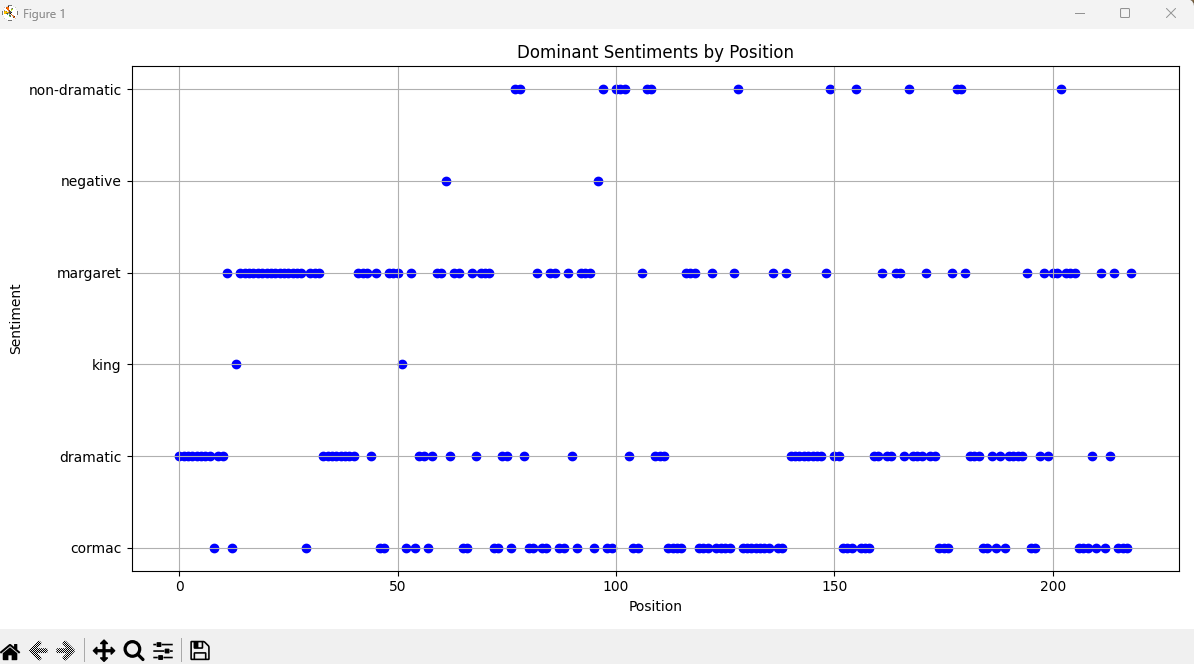
Figure 1 illustrates the output of the Python visualization script using a short story as the textual data described in the article.
Discussion
This was a limited experiment exploring the conditions under which ChatGPT can successfully generate code. I asked it to generate new code based on a description of the previous version rather than examining the code itself. ChatGPT generated the code descriptions in a prior session. I also asked it to update the earlier implementation based on my descriptive input, which it did largely successfully.
I leave it to future experimentation to determine under what circumstances ChatGPT is best served by generating code from a description/ specification or directly from code examples or baselines.
I recently came across discussions suggesting that large language models perform better with positive examples (and possibly positive instructions) than with negative ones. I also leave this to future experimentation. (Note: The use of negative prompting in the original article is in contrast to the specification used here.)
Appendix
C++ Client
=========================================
#include <iostream>
#include <fstream>
#include <sstream>
#include <string>
#include <vector>
#include "httplib.h"
#include "nlohmann/json.hpp"

using json = nlohmann::json;

std::string read_text_file(const std::string& file_path) {
    std::ifstream file(file_path);
    if (!file) {
        throw std::runtime_error("Could not open file " + file_path);
    }
    std::stringstream buffer;
    buffer << file.rdbuf();
    return buffer.str();
}

std::vector<std::string> create_sliding_windows(const std::string& text, size_t window_size, size_t overlap) {
    std::vector<std::string> windows;
    std::istringstream iss(text);
    std::vector<std::string> tokens;
    std::string word;
    while (iss >> word) {
        tokens.push_back(word);
    }

    for (size_t i = 0; i < tokens.size(); i += (window_size - overlap)) {
        size_t end_index = std::min(i + window_size, tokens.size());
        std::string window_text;
        for (size_t j = i; j < end_index; ++j) {
            window_text += tokens[j] + " ";
        }
        windows.push_back(window_text);
        if (end_index == tokens.size()) {
            break;
        }
    }

    return windows;
}

std::vector<std::string> read_sentiment_anchors(const std::string& file_path) {
    std::vector<std::string> anchors;
    std::ifstream file(file_path);
    if (!file) {
        throw std::runtime_error("Could not open sentiment anchors file " + file_path);
    }
    std::string line;
    while (std::getline(file, line)) {
        if (!line.empty()) {
            anchors.push_back(line);
        }
    }
    return anchors;
}

int sentiment_main() {
    try {
        // Step 1: Read the Document
        std::string file_path = "C:/Users/natha/source/repos/data/Wee-kh-sah_38.txt";
        std::string text = read_text_file(file_path);

        // Step 2: Create Sliding Windows
        size_t window_size = 100; // Adjust as needed
        size_t overlap = 50;      // Adjust as needed
        std::vector<std::string> windows = create_sliding_windows(text, window_size, overlap);

        // Step 3: Read Sentiment Anchors
        std::string sentiments_file = "sentiments.txt";
        std::vector<std::string> sentiment_anchors = read_sentiment_anchors(sentiments_file);

        // Step 4: Prepare JSON payload
        json payload;
        payload["text_windows"] = windows;
        payload["sentiment_anchors"] = sentiment_anchors;

        // Step 5: Send data to server
        httplib::Client client("localhost", 8000);
        auto res = client.Post("/analyze", payload.dump(), "application/json");

        if (res && res->status == 200) {
            // Parse the response
            json response = json::parse(res->body);
            std::vector<std::string> sentiments = response["sentiments"];

            // Output results
            std::ofstream output_file("sentiment_results.csv");
            output_file << "Position,Sentiment\n";
            for (size_t i = 0; i < sentiments.size(); ++i) {
                output_file << i << "," << sentiments[i] << "\n";
            }
            std::cout << "Sentiment analysis complete. Results saved to sentiment_results.csv" << std::endl;
        }
        else {
            std::cerr << "Error: Failed to get response from server." << std::endl;
            if (res) {
                std::cerr << "Status code: " << res->status << std::endl;
                std::cerr << "Body: " << res->body << std::endl;
            }
        }

    }
    catch (const std::exception& e) {
        std::cerr << "Exception: " << e.what() << std::endl;
    }
    return 0;
}
Python Server
=========================================

# uvicorn sentiment_server3:app --host 0.0.0.0 --port 8000


from fastapi import FastAPI, HTTPException
from pydantic import BaseModel
from langchain.embeddings import OpenAIEmbeddings
import os
from typing import List
import nltk
from nltk.tokenize import word_tokenize
from nltk.probability import FreqDist
import numpy as np

# Ensure NLTK resources are downloaded
nltk.download('punkt')

app = FastAPI()

# Initialize OpenAI embeddings
openai_api_key =  ""

embedding_model_name = "text-embedding-ada-002"

try:
    embeddings = OpenAIEmbeddings(model=embedding_model_name, openai_api_key=openai_api_key)
except Exception as e:
    print(f"Error initializing embeddings: {e}")
    embeddings = None

class AnalysisRequest(BaseModel):
    text_windows: List[str]
    sentiment_anchors: List[str]

class AnalysisResult(BaseModel):
    sentiments: List[str]

@app.post("/analyze", response_model=AnalysisResult)
def analyze_text(data: AnalysisRequest):
    if embeddings is None:
        raise HTTPException(status_code=500, detail="Embeddings model not initialized.")

    try:
        # Combine all text windows for tokenization
        all_text = ' '.join(data.text_windows)
        tokens = word_tokenize(all_text)
        total_word_count = len(tokens)

        # Token frequency distribution
        if total_word_count > 1000:
            freq_dist = FreqDist(tokens)
            # Get top 5% most common words
            num_common_words = max(1, int(len(freq_dist) * 0.05))
            common_words = [word for word, freq in freq_dist.most_common(num_common_words)]
        else:
            common_words = []

        # Function to tokenize and remove common words
        def preprocess_text(text):
            tokens = word_tokenize(text)
            tokens = [token for token in tokens if token.lower() not in common_words]
            return ' '.join(tokens)

        # Preprocess text windows
        preprocessed_windows = [preprocess_text(window) for window in data.text_windows]

        # Preprocess sentiment anchors
        preprocessed_anchors = [preprocess_text(anchor) for anchor in data.sentiment_anchors]

        # Get embeddings for sentiment anchors
        anchor_embeddings = embeddings.embed_documents(preprocessed_anchors)

        # Initialize list to store sentiments
        sentiments = []

        # Process each window
        for window in preprocessed_windows:
            # Get embedding for the window
            window_embedding = embeddings.embed_query(window)

            # Compute cosine similarities with each anchor
            similarities = []
            for anchor_embedding in anchor_embeddings:
                sim = cosine_similarity(window_embedding, anchor_embedding)
                similarities.append(sim)

            # Assign sentiment based on highest similarity
            max_index = similarities.index(max(similarities))
            sentiment = data.sentiment_anchors[max_index]
            sentiments.append(sentiment)

        return AnalysisResult(sentiments=sentiments)

    except Exception as e:
        raise HTTPException(status_code=500, detail=str(e))

def cosine_similarity(vec1, vec2):
    vec1 = np.array(vec1)
    vec2 = np.array(vec2)
    dot_product = np.dot(vec1, vec2)
    norm1 = np.linalg.norm(vec1)
    norm2 = np.linalg.norm(vec2)
    if norm1 == 0 or norm2 == 0:
        return 0.0
    return dot_product / (norm1 * norm2)
Python Visualizer
==================
import csv
import matplotlib.pyplot as plt

def read_csv(filename):
    positions = []
    sentiments = []
    with open(filename, 'r', newline='', encoding='utf-8') as csvfile:
        reader = csv.DictReader(csvfile)
        for row in reader:
            positions.append(int(row['Position']))
            # Extract the first word from the Sentiment column (before the colon)
            sentiment = row['Sentiment'].split(':')[0].strip()
            sentiments.append(sentiment)
    return positions, sentiments

def plot_sentiments(positions, sentiments):
    # Get the unique sentiments
    unique_sentiments = sorted(set(sentiments))
    # Map sentiments to numerical values for the y-axis
    sentiment_to_y = {sentiment: i for i, sentiment in enumerate(unique_sentiments)}
    y_values = [sentiment_to_y[sentiment] for sentiment in sentiments]

    plt.figure(figsize=(12, 6))
    plt.scatter(positions, y_values, color='blue')

    # Set y-axis ticks and labels
    plt.yticks(range(len(unique_sentiments)), unique_sentiments)
    plt.xlabel('Position')
    plt.ylabel('Sentiment')
    plt.title('Dominant Sentiments by Position')
    plt.grid(True)
    plt.tight_layout()
    plt.show()

if __name__ == "__main__":
    positions, sentiments = read_csv('sentiment_results.csv')
    plot_sentiments(positions, sentiments)